 小煜
5d9e09e9c3
小煜
5d9e09e9c3
- Add core addon files (__init__.py, KKPanel.py, preferences.py, common.py)
- Add import pipeline with armature, mesh, and material modification modules
- Add export pipeline with material baking and FBX preparation utilities
- Add material combiner tool for texture atlas generation and optimization
- Add extras utilities for animation, rigging, and asset management
- Add bone orientation data from better_fbx for accurate skeletal structure
- Add comprehensive documentation and wiki with multi-language support (EN, JP, ZH)
- Add animation library retargeting lists for ARP and Rokoko motion capture
- Add Rigify integration scripts for advanced rigging workflows
- Add shader file (KK Shader V8.0.blend) for material rendering
- Add manifest and license files for addon distribution
- Add changelog documenting version history and improvements
- Initialize complete Blender addon project for Koikatsu character import/export
20 lines
1.9 KiB
Markdown
20 lines
1.9 KiB
Markdown
# Import panel options
|
|
|
|
**You can hold your mouse over each option in the KKBP panel to get an explanation on what it does!**
|
|
|
|
This page will only cover things that are not immediately obvious from the explanations built into the panel.
|
|
|
|
## Default panel settings
|
|
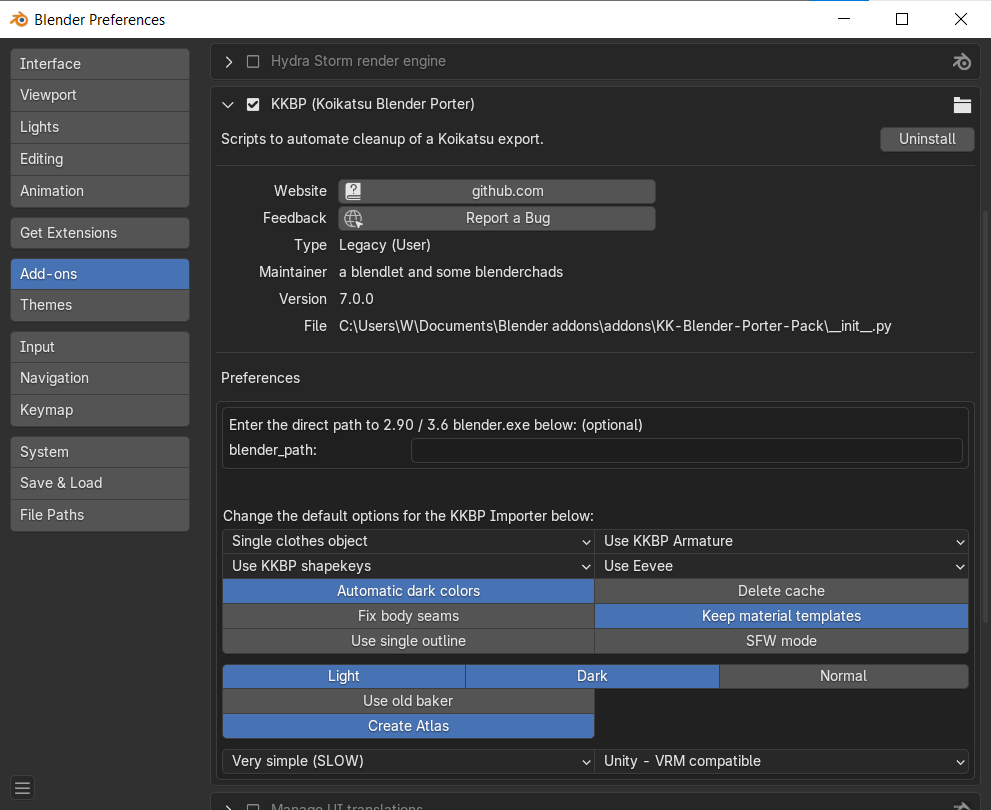
If you expand KKBP in Blender's addon menu, you can set default settings for the panel (so you don't have to set them each time you restart Blender).
|
|
|
|
|
|
## Extras panel
|
|
|
|
|
|
|
|
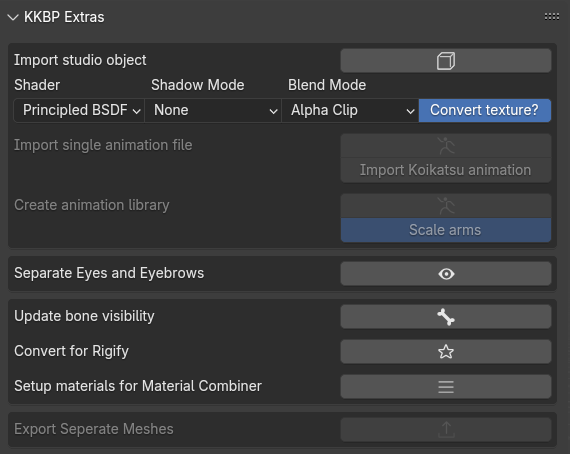
* Instructions for exporting studio objects from the game and importing them using the button in the panel [can be found here](https://www.youtube.com/watch?v=PeryYTsAN6E)
|
|
* Instructions for exporting animations from the game and applying them using the button in the panel can be found [here if you prefer text](https://github.com/FlailingFog/KK-Blender-Porter-Pack/blob/master/extras/animationlibrary/createanimationlibrary.py) or [here if you prefer video](https://www.youtube.com/watch?v=Ezsy6kwgBE0)
|
|
* If the "Use KKBP Armature" option was selected during import but you now want to swap to a Rigify armature, you can click the "Convert for Rigify" button to permanentally convert the KKBP one to a Rigify one.
|
|
* The "Separate Eyes and Eyebrows" button will separate the eyes and eyebrows into separate objects, then link their shapekeys to the Body object's shapekeys. This can be combined with the Cryptomatte compositor features to make the Eyes and Eyebrows show through the hair. See [this video for an example of selecting objects with Cryptomatte](https://www.youtube.com/watch?v=3UR4eXxMlsU).
|
|
* The "Setup Materials for Material Combiner" button will set up your materials for [Shotariya's Material Combiner addon](https://github.com/Grim-es/material-combiner-addon). You must Finalize your materials before you can do this.
|