 小煜
5d9e09e9c3
小煜
5d9e09e9c3
- Add core addon files (__init__.py, KKPanel.py, preferences.py, common.py)
- Add import pipeline with armature, mesh, and material modification modules
- Add export pipeline with material baking and FBX preparation utilities
- Add material combiner tool for texture atlas generation and optimization
- Add extras utilities for animation, rigging, and asset management
- Add bone orientation data from better_fbx for accurate skeletal structure
- Add comprehensive documentation and wiki with multi-language support (EN, JP, ZH)
- Add animation library retargeting lists for ARP and Rokoko motion capture
- Add Rigify integration scripts for advanced rigging workflows
- Add shader file (KK Shader V8.0.blend) for material rendering
- Add manifest and license files for addon distribution
- Add changelog documenting version history and improvements
- Initialize complete Blender addon project for Koikatsu character import/export
1.8 KiB
1.8 KiB
导入面板选项
你可以将鼠标悬停在 KKBP 面板中的每个选项上以获取有关其功能的说明!
本页仅涵盖面板内置说明中不太明显的内容。
默认面板设置
如果你在 Blender 的插件菜单中展开 KKBP,可以为面板设置默认设置(这样你就不必在每次重启 Blender 时都设置它们)。
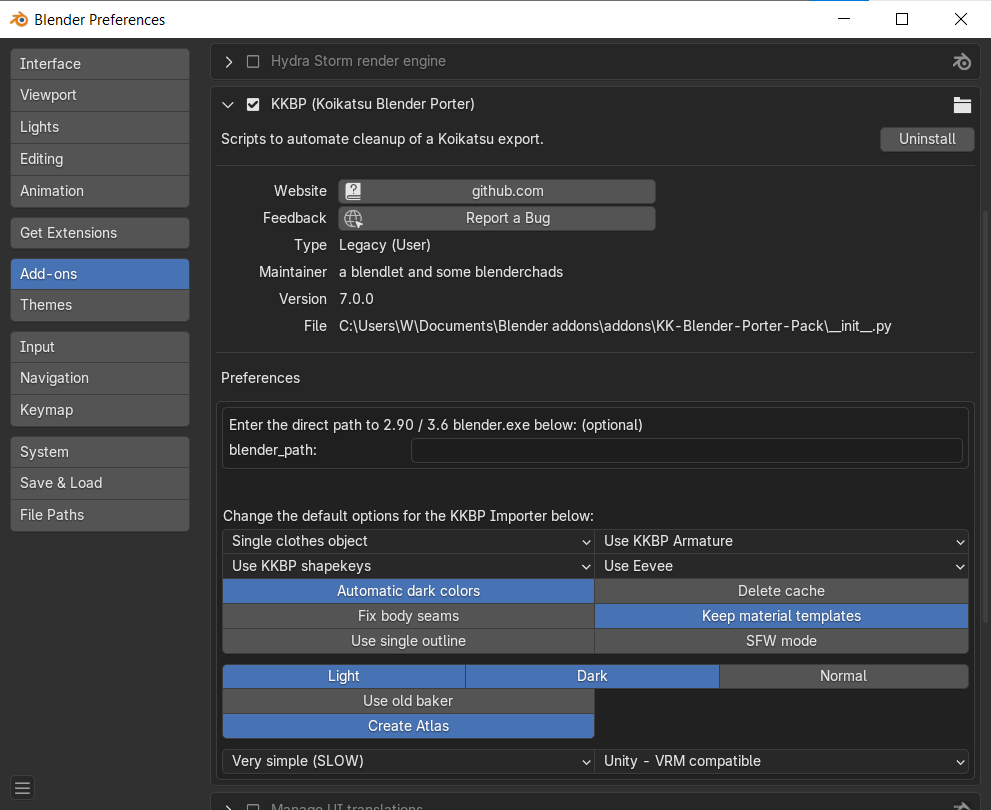
额外功能面板
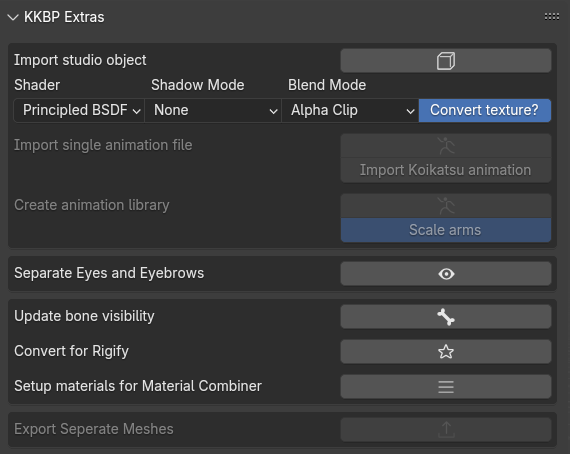
- 从游戏中导出工作室对象并使用面板中的按钮导入它们的说明可以在这里找到
- 从游戏中导出动画并使用面板中的按钮应用它们的说明可以在这里找到(如果你喜欢文本)或这里(如果你喜欢视频)
- 如果在导入期间选择了"使用 KKBP 骨架"选项,但你现在想切换到 Rigify 骨架,可以点击"转换为 Rigify"按钮将 KKBP 骨架永久转换为 Rigify 骨架。
- "分离眼睛和眉毛"按钮将眼睛和眉毛分离为单独的对象,然后将它们的形态键链接到 Body 对象的形态键。这可以与 Cryptomatte 合成器功能结合使用,使眼睛和眉毛透过头发显示。请参见此视频以了解使用 Cryptomatte 选择对象的示例。
- "为材质合并器设置材质"按钮将为 Shotariya 的材质合并器插件设置你的材质。在执行此操作之前,你必须先完成材质。