 小煜
5d9e09e9c3
小煜
5d9e09e9c3
- Add core addon files (__init__.py, KKPanel.py, preferences.py, common.py)
- Add import pipeline with armature, mesh, and material modification modules
- Add export pipeline with material baking and FBX preparation utilities
- Add material combiner tool for texture atlas generation and optimization
- Add extras utilities for animation, rigging, and asset management
- Add bone orientation data from better_fbx for accurate skeletal structure
- Add comprehensive documentation and wiki with multi-language support (EN, JP, ZH)
- Add animation library retargeting lists for ARP and Rokoko motion capture
- Add Rigify integration scripts for advanced rigging workflows
- Add shader file (KK Shader V8.0.blend) for material rendering
- Add manifest and license files for addon distribution
- Add changelog documenting version history and improvements
- Initialize complete Blender addon project for Koikatsu character import/export
66 lines
4.6 KiB
Markdown
66 lines
4.6 KiB
Markdown
## 如何使用导出器
|
||
|
||
1. 安装 <a style="font-weight:bold" href="https://github.com/ManlyMarco/KK-HF_Patch">Koikatsu 的 HF 补丁</a>,或 <a style="font-weight:bold" href="https://github.com/ManlyMarco/KKS-HF_Patch">Koikatsu Sunshine 的 HF 补丁</a>。
|
||
**预修改的重新打包版本将无法工作**,除非你使用重新打包的自动更新程序更新或安装 HF 补丁。
|
||
[点击这里查看重新打包解决方法 #1。](https://github.com/FlailingFog/KK-Blender-Porter-Pack/issues/465#issuecomment-2602969013)
|
||
[点击这里查看重新打包解决方法 #2。](https://github.com/FlailingFog/KK-Blender-Porter-Pack/issues/523)
|
||
[点击这里查看重新打包解决方法 #3。](https://github.com/FlailingFog/KK-Blender-Porter-Pack/issues/560)
|
||
|
||
1. 找到你的 Koikatsu 安装目录,并将 <a style="font-weight:bold" href="https://github.com/FlailingFog/KK-Blender-Porter-Pack/releases">KKBP 导出器</a>拖到 /bepinex/plugins/ 文件夹中
|
||
|
||
1. 启动 Koikatsu 并打开角色制作器
|
||
|
||
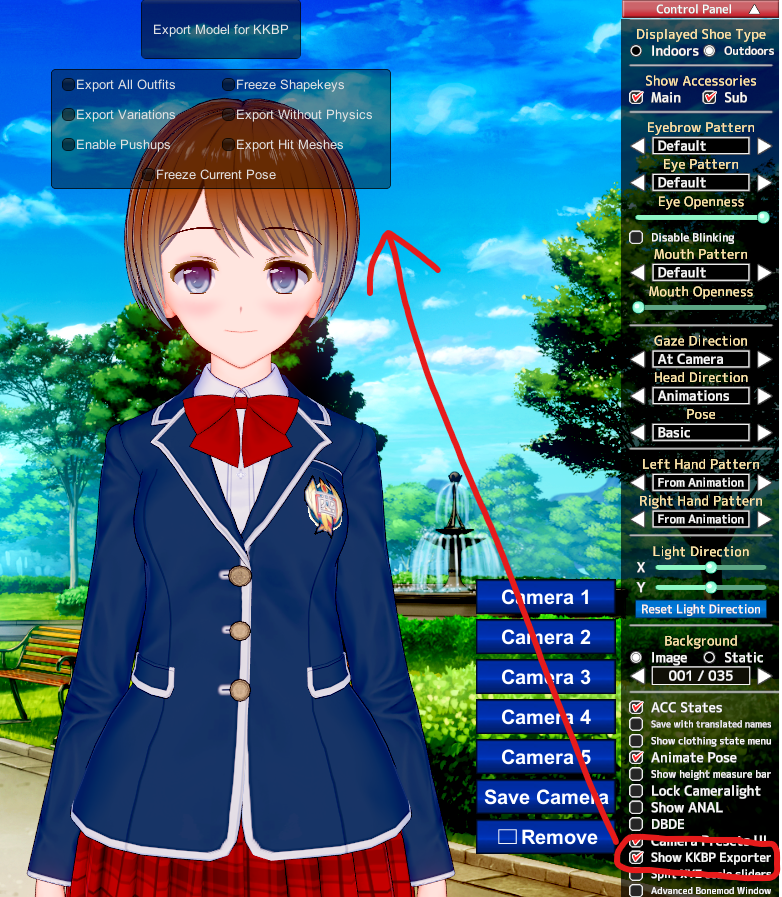
1. 启用 KKBP 导出器窗口。
|
||
|
||
|
||
1. 更改你的导出选项。[有关所有导出选项的说明,请参见此页面](export_panel)。
|
||
|
||
1. 点击屏幕顶部的"Export Model for KKBP"按钮。这可能需要几分钟,具体取决于你的计算机硬件。
|
||
|
||
3. 导出完成后,Koikatsu 安装目录中的一个文件夹将弹出
|
||
|
||
## 如何使用导入器
|
||
1. 打开 Blender 4.2 LTS。**不保证其他版本可以工作。** [如果你没有使用 Blender 4.2,请点击这里](faq)
|
||
|
||
1. 在 Blender 中安装 <a style="font-weight:bold" href="https://extensions.blender.org/add-ons/mmd-tools/">mmd_tools</a>
|
||
|
||
1. 在 Blender 中安装 <a style="font-weight:bold" href="https://github.com/FlailingFog/KK-Blender-Porter-Pack/releases">KKBP Importer 8.0.0</a>
|
||
|
||
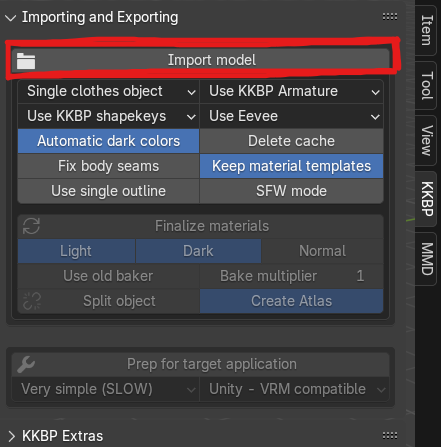
1. 安装两个插件后,你可以点击 KKBP 面板中的"Import model"按钮。[所有导入选项的说明可以在这里找到](import_panel)
|
||
|
||
|
||
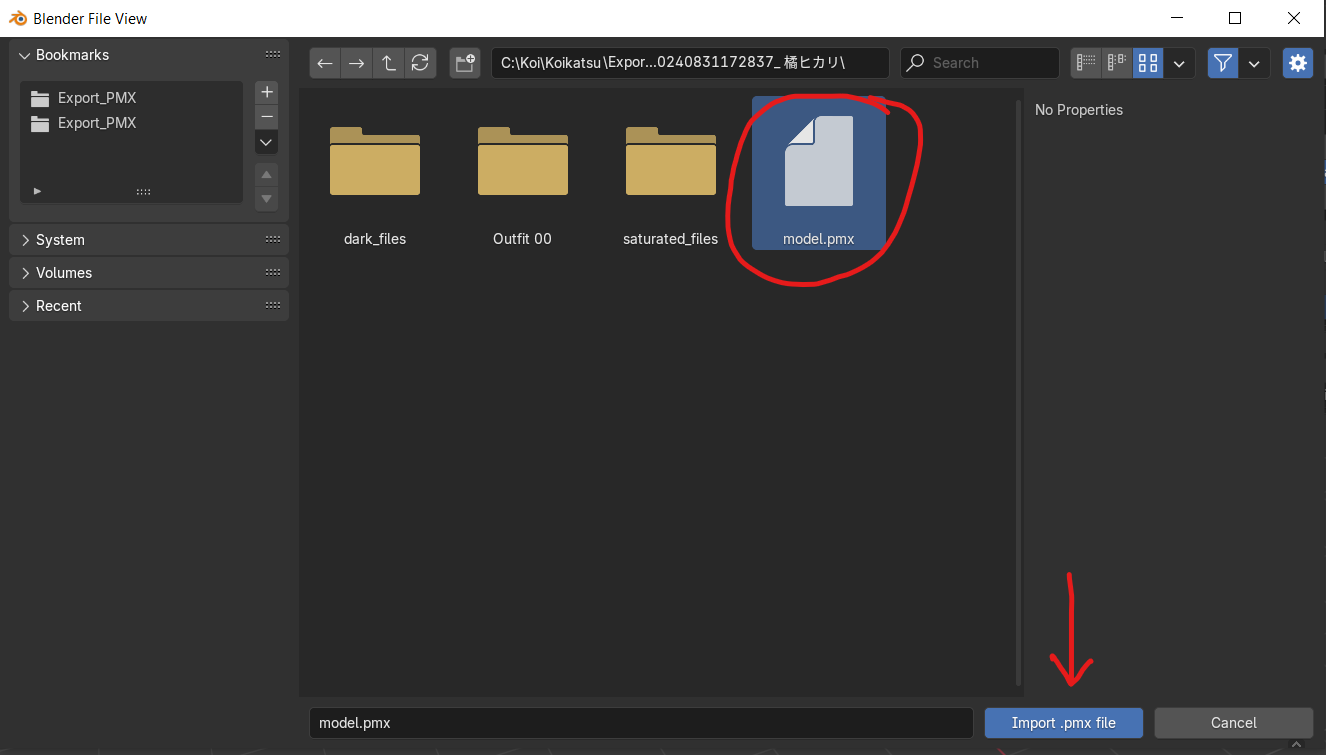
1. 从导出文件夹中选择 .pmx 文件
|
||
|
||
|
||
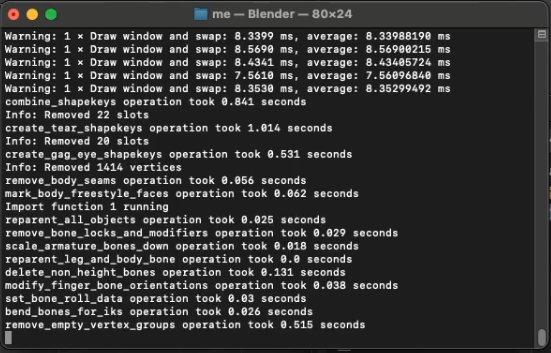
1. Blender 控制台将出现并开始导入模型。这可能需要几分钟,具体取决于你的计算机硬件
|
||
|
||
|
||
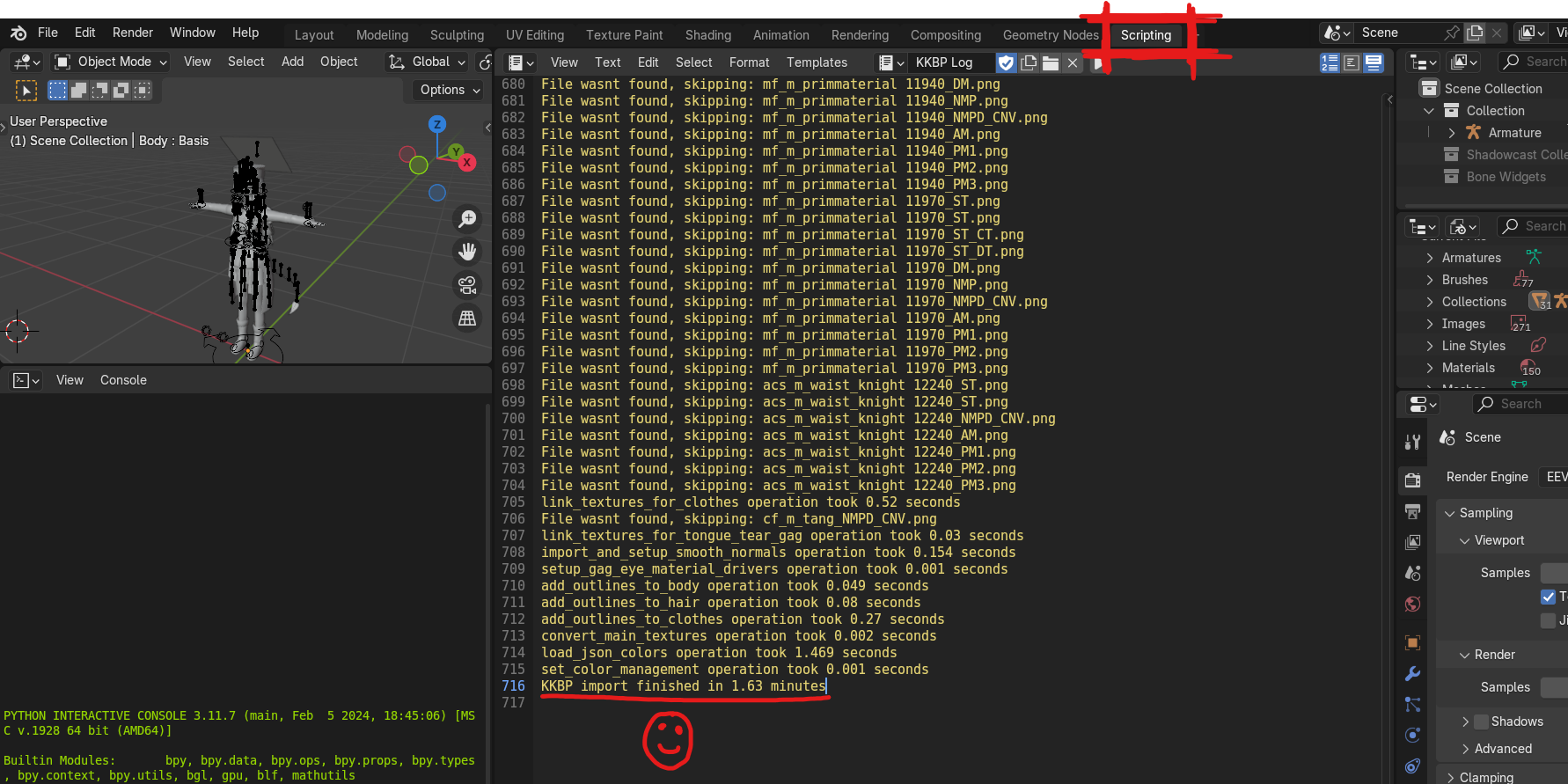
1. 在脚本选项卡中检查导入期间是否没有错误。成功的导入将以"KKBP import finished in XX minutes"结束
|
||
|
||
|
||
## 在 Blender 中编辑模型
|
||
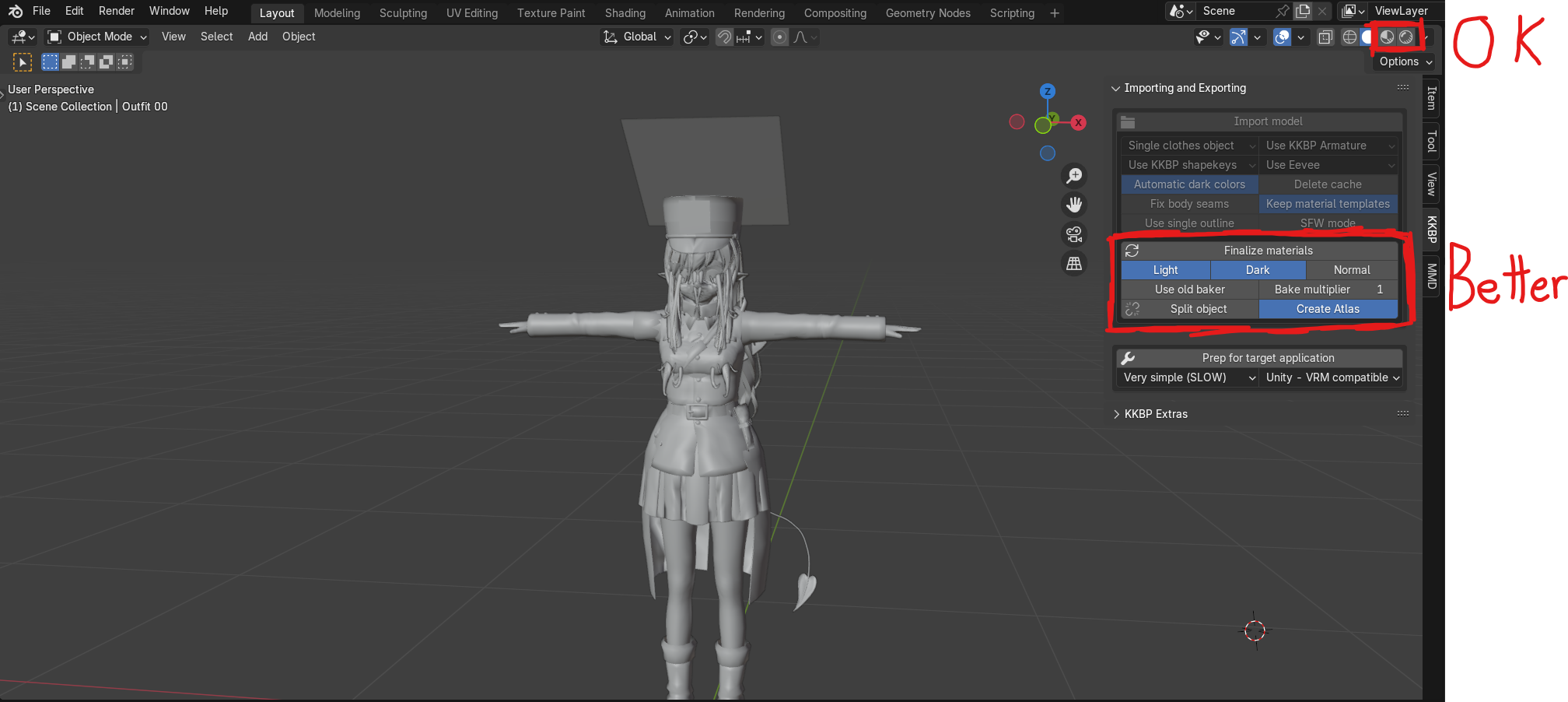
1. 如果没有错误,你可以通过激活右上角的材质预览来开始按原样使用模型。如果你的计算机编译所有着色器需要很长时间(超过 60 秒),建议通过点击 KKBP 面板中的按钮来完成材质。如果你完成材质,则着色器将非常快速地编译。完成材质可能需要 5 到 30 分钟,具体取决于你的硬件和模型。
|
||
|
||
|
||
1. 如果没有错误但某些东西看起来不对,请查看 [FAQ](faq) 或[材质分解](material_breakdown)页面以获取有关如何编辑材质的信息。
|
||
|
||
1. 如果你在导入期间遇到错误,请查看 [FAQ](faq),或搜索 [Github 仓库上的问题页面](https://github.com/FlailingFog/KK-Blender-Porter-Pack/issues)以查看是否有其他人遇到与你相同的问题。
|
||
|
||
## 从 Blender 导出到 fbx:
|
||
|
||
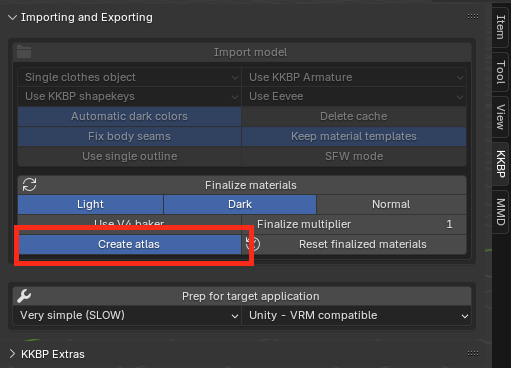
1. 启用 Atlas 选项,然后点击 KKBP 面板中的完成材质按钮
|
||
|
||
|
||
1. 这会做三件事
|
||
* 将所有材质完成为 png 文件并将它们保存到导出文件夹中的 baked_files 文件夹
|
||
* 为你的身体/头发/衣服创建一个图集文件并将它们保存到导出文件夹中的 atlas_files 文件夹
|
||
* 创建一个使用图集的新集合
|
||
|
||
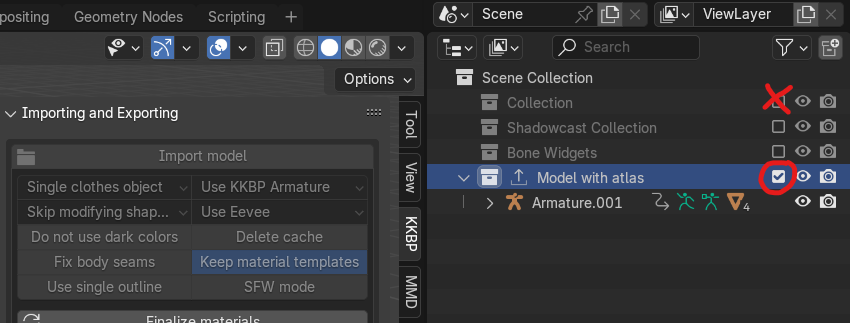
1. 在大纲视图中隐藏原始集合并显示新集合
|
||
|
||
|
||
1. 如果你想减少骨骼数量,或为 VRM / VRChat / Unreal Engine 转换模型的骨架,请点击"Prep for target application"按钮。
|
||
|
||
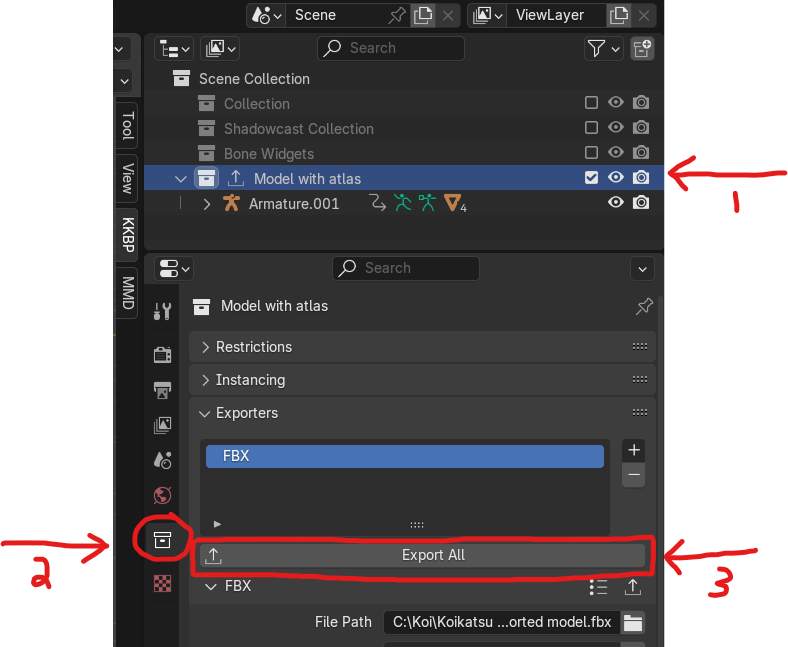
1. 点击集合选项卡中的导出按钮,将 fbx 文件导出到导出文件夹中的 atlas_files 文件夹
|
||
|